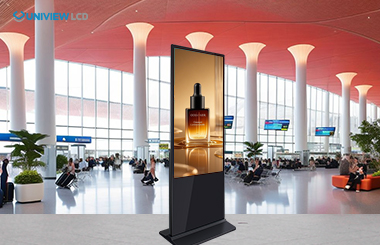
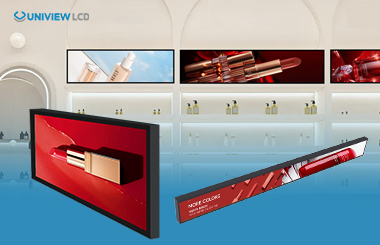
Interactive kiosk displays are transforming retail by seamlessly connecting digital and physical shopping experiences. These self-service devices use advanced touch technology, real‑time data sync, and robust connectivity to make omnichannel shopping smooth and efficient. By linking to inventory systems, CRM platforms, and payment gateways, kiosks let customers browse products, check stock, make purchases, and receive personalized recommendations—all inside the store. This integration eliminates the gap between online and in‑store shopping, meeting modern consumers’ demands for convenience and speed.
Core Components of Modern Kiosk Technology
Today’s interactive kiosks rely on several key technologies:
Bridging Online and Offline Shopping
Kiosks integrate directly with CRM, ERP, and inventory databases, enabling instant data sharing across channels. Customers see the same product selection, pricing, and promotions as on mobile apps or websites. This consistency eliminates the frustration of finding online items unavailable in store. From a physical location, users can view product details, compare options, read reviews, and access purchase history and loyalty rewards—putting the digital storefront at their fingertips.
Key Benefits of Interactive Kiosk Displays
1. Enhanced Customer Engagement
Kiosks let shoppers browse at their own pace without waiting for staff—especially valuable during peak hours. Users can explore full catalogs, filter by criteria, read specifications, and see user reviews. Retailers using kiosks often see higher average transaction values because kiosk users tend to discover more items. Multilingual support makes them accessible to diverse customers.
2. Streamlined Operations & Workforce Optimization
Kiosks automate routine tasks like product lookup, price checks, inventory verification, and basic checkout. This frees staff for high‑value activities: personalized advice, problem‑solving, and relationship building. Express checkout lanes reduce wait times. Targeted advertising on kiosk screens creates upselling and cross‑selling opportunities based on browsing history. Automation also reduces human error in transactions and inventory tracking.
3. Valuable Customer Insights
Every interaction generates data. Kiosks track which products customers view most, time spent, search terms, and conversion paths. Retailers analyze this data to optimize product placement, refine marketing, adjust pricing dynamically, and improve demand forecasting. This enables personalized promotions based on actual preferences rather than demographics.
Types of Kiosk Displays
Indoor Kiosks – High‑resolution screens with wide viewing angles, sleek enclosures (brushed metal, tempered glass), and capacitive touch. Sizes from 21″ tabletop to 55″ floor‑standing. Optional cameras for virtual try‑ons, NFC for contactless payments, and premium audio.
Outdoor Kiosks – Ruggedized with IP65/IP66 weatherproofing, sunlight‑readable screens (2,000–4,000 nits) with anti‑glare coatings, and thermal management from -20°C to +60°C. Vandal‑resistant construction includes shatterproof glass and reinforced steel. Automatic brightness adjustment saves energy. EMI protection ensures reliability near industrial equipment.
Specialized Features – Thermal printers for receipts/tickets, barcode/QR scanners, EMV card readers, contactless NFC (Apple Pay, Google Pay), document scanners, and biometric authentication (facial or palm recognition) for secure access.
Software Capabilities for Omnichannel Integration
Open‑architecture software with standard APIs enables real‑time inventory sync across all locations. CRM integration allows kiosks to recognize returning customers and offer personalized recommendations. Loyalty program connections instantly apply rewards. Payment platform integration supports multiple methods and currencies. Content management systems let marketing teams remotely update ads, product details, and interfaces. Advanced analytics dashboards show real‑time interaction patterns and conversion data.
How to Select the Right Kiosk Solution
Hardware Specifications – Screen size depends on application: smaller for wayfinding, larger for complex catalogs. Touch technology balances responsiveness and durability. Processing power must handle demanding media. Multiple connectivity options (USB, Ethernet, Wi‑Fi, Bluetooth, cellular) ensure compatibility. Operating temperature ranges must match deployment locations.
Integration Flexibility – Verify compatibility with ERP (SAP, Oracle), CRM (Salesforce, HubSpot), e‑commerce (Shopify, Magento), and payment processors. Well‑documented APIs indicate ease of customization. Choose between cloud‑based or on‑premise architecture based on data ownership and scalability needs.
Customization vs. Speed – Standardized kiosks offer faster deployment and lower costs. Custom units provide unique branding and specific process integration but involve longer lead times (8–16 weeks) and higher prices. A hybrid approach—standard core with customizable exterior—often works best.
Total Cost of Ownership – Include installation, maintenance, software licensing, network connectivity, and upgrades. Extended warranties and SLAs ensure operational continuity. Bulk orders (50+ units) typically receive 10–15% discounts. Leasing spreads capital costs; rental suits short‑term pilots or seasonal pop‑ups.
Real‑World Use Cases
Buy‑Online‑Pick‑Up‑In‑Store (BOPIS) – Customers order online, then pick up in store. Kiosks verify identity via scan codes or order numbers, then open lockers or alert staff. This eliminates checkout lines. Kiosks also support in‑store browsing with online checkout: customers scan barcodes to see details, add items to digital carts, and complete orders for home delivery. Retailers benefit because customers can order from the entire network’s inventory.
Quick‑Service Restaurants – Kiosks compensate for labor shortages, improve order accuracy, and increase average ticket values by 15–20% through effective upselling. Customers view full menus with nutritional info and customization. Order accuracy improves as kitchen staff receive precise digital instructions. Multiple kiosks handle peak traffic. Kiosks also handle dietary restrictions and allergen filtering.
Corporate & Transportation – Corporate sites use kiosks for visitor check‑in, badge printing, and wayfinding. Transportation hubs deploy them for ticket sales, schedules, and navigation. Passengers can buy tickets, compare routes, see real‑time arrivals, and access accessibility services. These systems operate 24/7 without staffing costs.
Emerging Technologies
AI enables conversational interfaces where users speak to virtual assistants. AI‑powered kiosks understand context and guide customers through complex selections. Augmented reality, using built‑in cameras, lets customers visualize furniture in their homes or makeup on their faces. IoT connectivity allows kiosks to monitor real‑time inventory, alert staff when popular items run low, and adjust promotions based on stock levels. Facial recognition personalizes experiences for returning customers without repeated logins.
Conclusion
Interactive kiosk displays are essential for omnichannel retail. They merge digital and physical experiences, empower customers, improve efficiency, and generate actionable data. The technology addresses rising labor costs, consumer demand for seamless multichannel experiences, and the need for data‑driven decisions. As AI, AR, and IoT advance, kiosks will become even more powerful tools for creating personalized, memorable customer experiences that drive loyalty and revenue.
Partner with Uniview Commercial
Uniview Commercial offers high‑quality interactive kiosk display solutions for complex omnichannel applications. Our portfolio includes elegant indoor models and rugged outdoor models (2,000–4,000 nits, IP66). Every kiosk features advanced thermal management, corrosion‑resistant treatment, and wind resistance up to level 16, ensuring reliable 24/7 operation.
With a presence in over 100 countries, we provide flexible customization tailored to your brand. Our technical team supports selection, integration, and deployment. Full 3‑5 year warranties and 24/7 global support protect your investment.
Contact us at lcdsales@univiewlcd.com to discuss your interactive kiosk requirements and receive detailed specifications and pricing. Together, we will create outstanding digital experiences that enhance customer satisfaction and deliver real business results.
 English
 Chinese (Simplified)
 Japanese
 Spanish