Overview
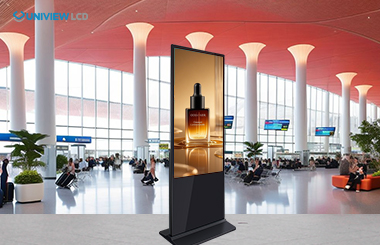
Indoor floor-standing kiosks with remote Content Management Systems (CMS) are cutting-edge interactive solutions for transportation, retail, and professional sectors. Equipped with commercial-grade hardware and user-friendly cloud-based software, they enable real-time remote content management and adjustments, elevating customer experiences and operational efficiency while supporting scalable digital engagement for modern businesses.
Core Value & Advantages
Key Benefits for Businesses
These interactive vertical displays replace traditional static signs, solving core operational pain points and driving tangible business value:
Labor Cost Reduction: 24/7 automated self-service handles check-ins, orders and info requests, cutting staffing needs during peak hours and eliminating overtime costs.
Enhanced Customer Experience: Eliminates wait times, delivers consistent service and supports multilingual options for global audiences.
Data-Driven Insights: Built-in sensors track customer behavior, preferences and engagement, providing actionable data for business decisions.
Space Optimization: Vertical design maximizes floor space while offering ample screen area for content and interaction in high-traffic zones.
Strong ROI: Combines the above advantages to upgrade customer interaction strategies without disrupting daily operations.
Hardware Reliability & Durability
Constructed with industrial-grade components for 24/7 uninterrupted operation:
Displays: 350–2500 nits brightness, Mohs 7-hardness tempered glass; top-brand IPS screens (LG/Samsung/BOE) with 178° viewing angles, 1080P–4K resolution and advanced thermal control.
Enclosures: Powder-coated steel or aluminum alloy, IP55–IP65 dust and water resistance.
Touch Technology: PCAP/IR sensors with 10-point multi-touch and <10ms response time; industrial motherboards (Windows 10/11 IoT Enterprise/Android 11/12) with watchdog settings to prevent freezing.
Thermal Management: LED-backlit LCD panels (50,000+ hours MTBF), intelligent fan control and aluminum frames, keeping noise below 60 decibels.
Technical Operation & Remote CMS Capabilities
Hardware Architecture
Modular design integrates core computing modules with add-ons (thermal printers, QR/barcode scanners, NFC readers, payment systems), allowing customization for specific business needs. All components support continuous commercial operation and seamless user interaction.
Remote CMS Core Functions
Cloud-based CMS platforms enable centralized, real-time management of multi-location kiosk networks:
Unified Content Control: Remote content updates, scheduling and performance tracking across all devices, with instant sync for consistent branding and messaging.
Role-Based Permissions: Granular access control for team members, aligning with security protocols.
Smart Scheduling: Custom campaigns/ads based on time zones, holidays or promotions.
Remote Diagnostics: IT teams can monitor system health, identify and resolve issues without on-site visits.
Network Resilience: Bandwidth optimization, automatic backups and offline content caching ensure operation during internet outages; supports HD video, interactive apps and adaptive web content.
How to Choose the Right Kiosk
Display Technology & Resolution
Brightness: 350–500 nits for standard indoor use; up to 2500 nits for window-facing installations (sunlight visibility).
Screen Size: 32–85 inches, determined by viewing distance, content complexity and available space.
Resolution: 1080P FHD for most business needs; 4K UHD for high-end setups/fine text display.
Touch Option: Selected based on user interaction needs and budget.
Hardware Durability & Environment
Chassis: SPCC cold-rolled steel or aviation-grade aluminum alloy (anti-EMI, rigid structure) with powder coating/anodization for rust protection and aesthetics.
Touch Screen Protection: 3–6mm tempered glass with optional anti-glare/anti-fingerprint coating; durable for millions of touches, with tamper-proof mounting/casings available.
CMS Compatibility & Integration
Cloud vs On-Premise CMS: Cloud offers auto-updates and global access; on-premise provides enhanced security and lower subscription costs.
System Integration: Seamless connection with POS, customer databases and analytics tools via APIs; supports custom app development and workflow automation for added value.
Practical Industry Use Cases
Retail & Quick Service Restaurants (QSR)
Self-service ordering/payment, integrated with POS for complex menu customization and receipt printing.
Visual upselling boosts average order value; product info, inventory tracking and customer registration for retail stores.
Real-time inventory sync enables product reservation and inter-store transfer requests.
Healthcare & Corporate Environments
Healthcare: Patient check-in, appointment booking, wayfinding and EMR integration (OCR for insurance verification), reducing wait times and streamlining admin work.
Corporate: Interactive directories, visitor management (badge printing, host alerts), building info displays and real-time meeting room booking (integrated with building control platforms).
Transportation & Public Facilities
Transportation: 24/7 ticket sales, schedule displays and passenger assistance at airports/stations; anti-glare coatings and hardened bases for high-traffic, variable lighting environments.
Public/Government: Queue management, permit applications, public services; integration with government systems for document printing, payments and appointments, with multilingual support for accessibility compliance.
Maintenance Best Practices
Regular maintenance ensures long-term reliability and maximizes ROI, with core protocols including:
Monthly Hardware Inspections: Calibrate displays, test touch sensitivity and check secondary devices to identify issues early.
Software Update Management: Auto-updates for security patches/features, scheduled during low-traffic hours to minimize service interruptions.
Environmental Monitoring: Temperature/air quality tracking prevents overheating, extending component life and maintaining performance.
Cybersecurity: Regular password changes, software patches and network monitoring to mitigate risks.
Procurement & After-Sales Support
Procurement Strategies
Sourcing: Direct manufacturer partnerships for large-scale deployments (cost-effective); authorized wholesalers for small setups (local support, fast shipping).
Bulk Buying: Reduces unit costs, ensures consistent specs; volume savings, extended warranties and bundled services improve total cost of ownership (TCO).
Customization: OEM manufacturing for branding, unique form factors and specialized fittings; direct manufacturer consultation for complex customizations.
Financing Options
Loans/Leasing: Capital equipment loans for upfront network setup; leasing offers fixed monthly costs, maintenance and upgrades to keep technology current, with tax benefits and cash flow flexibility.
Rental: Ideal for short-term projects, events or trial deployments, with upgrade options for evolving business needs.
Logistics & Installation
Global Shipping: ISTA 1A-compliant packaging for damage-free delivery; custom documentation (certificates of origin, compliance statements) for international customs.
Installation Support: Ranges from basic delivery/setup to full project management (site surveys, custom mounting, network integration); local technical support is a key consideration for long-term operation.
Emergency Replacement: Minimizes downtime for critical equipment failures.
Warranty & Technical Support
Warranties: 1–3 years standard coverage (parts + labor); extended coverage for mission-critical installations; component-specific coverage for displays, computing units and touch sensors (matching different lifespans).
Support Infrastructure: 24/7 multi-channel support (phone/email, online diagnostics, on-site service); guaranteed response times for urgent issues (paid services).
Internal Training: IT staff training programs reduce reliance on external support and build in-house expertise.
Conclusion
Indoor floor-standing kiosks with easy remote CMS capabilities are transformative technologies for retail, corporate, transportation and public sectors. By combining industrial-grade hardware, advanced display technology, robust environmental protection and full remote control, they deliver scalable digital interaction tools that enhance customer experiences and cut business costs. To maximize ROI and operational efficiency, deployment must carefully align with technical specifications, environmental requirements and long-term support infrastructure.
 English
 Chinese (Simplified)
 Japanese
 Spanish